1.3.1
Networks and Topologies
Networks connect devices so they can communicate and share resources. You need to know the difference between LANs and WANs, what key network hardware does, how client-server and peer-to-peer networks compare, what DNS and the cloud do, and why star and mesh topologies suit different situations.
On this page12 sectionsHide
What you need to know
- Describe the difference between a LAN and a WAN and give common examples.
- Explain the role of routers, switches, NICs, wireless access points, and transmission media.
- Compare client-server with peer-to-peer networks.
- Explain DNS, hosting, web servers, clients, and the cloud.
- Compare star and mesh topologies and choose the best one for a scenario.
Big Picture
Why networks are used
A network is a group of connected devices that can communicate and share resources.
Networking allows users to share files, printers, software, and Internet access. It also makes it easier to communicate and manage resources centrally.
In exams, try to explain the benefit in context. For example, a school network makes it easier for students to log in on different computers and still access the same files.
- Networks let devices communicate.
- Networks make resource sharing easier.
- Networks can reduce duplication of hardware and software.
- Large networks can also be managed more centrally.
Core Knowledge
LANs and WANs
You need to know both the characteristics and common examples of each network type.
| Type | What it means | Typical example | Key point |
|---|---|---|---|
| LAN | Local Area Network | A school, office, or home network | Usually covers one building or site |
| WAN | Wide Area Network | A bank linking branches or the Internet | Connects networks over a large area |
Quick exam phrase
A WAN is not just a large LAN. A WAN links networks together over a wide geographical area.
Must-Know Hardware
Network hardware
Questions often name a device and expect you to know exactly what job it does.
A router forwards data between networks, so it is the device that helps traffic move from one network to another. A switch connects devices on a LAN and helps data reach the correct device inside that network.
A NIC allows a device to join a network, a wireless access point provides Wi-Fi access, and transmission media is the path the data travels through, such as copper cable, fibre optic cable, or radio waves.
- Router: connects one network to another.
- Switch: connects devices within a LAN.
- NIC: allows a device to connect to a network.
- WAP: provides wireless access to a network.
- Transmission media: carries the data, for example copper cable or fibre optic cable.
Performance
What can make a network feel fast or slow
This often comes up inside a scenario question, such as a slow school network or weak wireless connection.
Bandwidth is the amount of data that can be transferred each second. Higher bandwidth usually means more data can move at once, but it does not guarantee perfect performance in every situation.
Latency is the delay before data starts arriving. A connection can have reasonable bandwidth but still feel slow if there is noticeable delay. Wireless interference, physical barriers, many connected users, and retransmission of lost data can all reduce performance.
- High bandwidth usually helps speed.
- More devices sharing a connection can reduce performance.
- Interference can weaken wireless communication.
- High latency makes responses feel delayed.
Network Roles
Client-server vs peer-to-peer
The definitions are straightforward, but it helps to picture what these networks actually look like in practice.
In a client-server network, one or more central servers provide services such as file storage, printing, logins, or web pages. The other computers are clients because they request those services.
In a peer-to-peer network, the computers have a more equal role. They can share files or resources directly with one another instead of relying on one main server.
| Idea | What it means | Why it matters |
|---|---|---|
| Client-server | Clients request services from a central server | Security and backups can be managed centrally |
| Peer-to-peer | Each computer can share directly with others | Can be cheaper and simpler on a small network |
How to explain this in an exam
Do not stop at naming the network type. Say how resources are shared and why that helps or limits the organisation.
Internet Services
DNS, hosting, web servers, and the cloud
These terms fit together when you follow one journey from browser to website.
When you type a web address into a browser, the DNS helps find the correct IP address. Once the device knows that address, it can contact the right web server and request the page.
Hosting means the website or online service is stored on hardware that is available to users over a network. Cloud services are a wider idea: storage, software, or processing power are provided remotely rather than only on your own computer.
- The Internet is a network of networks.
- DNS is made up of multiple domain name servers working together.
- Cloud services can reduce local costs, but they depend on Internet access and trust in the provider.
| Idea | What it means | Why it matters |
|---|---|---|
| DNS | Converts a URL into an IP address | Helps devices find the correct server |
| Hosting | Providing server space and services for websites or files | Allows online content to be made available |
| Cloud | Remote provision of storage, software, or processing | Lets users access services over the Internet |
Cloud balance
Cloud services can reduce local hardware costs and improve access, but they depend on an Internet connection and raise security or privacy concerns.
Put It Together
What happens when you open a website
Following a single request from browser to website connects several network terms together.
- You enter a web address in the browser.
- DNS helps find the matching IP address.
- Your device contacts the web server at that address.
- A protocol such as HTTP or HTTPS is used to request the page.
- The server sends the page data back to the client device.
Exam shortcut
If a question mentions browser, DNS, IP address, and server together, it is often testing the journey from URL to webpage.
High-Value Exam Skill
Star vs mesh topologies
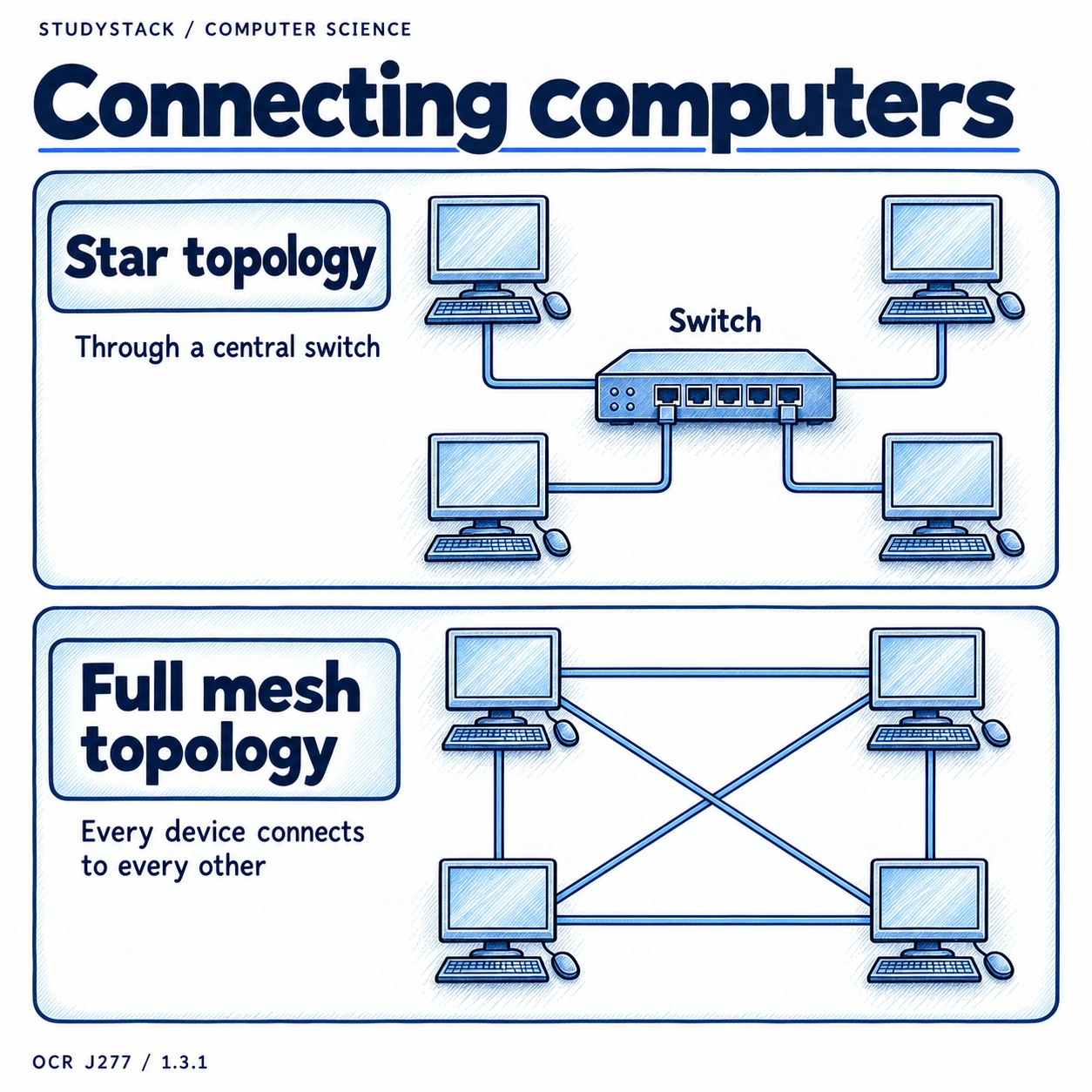
Topology means the layout of the network connections.
- A star network connects devices through a central device such as a switch.
- A mesh network has many direct links between devices.
- In a scenario question, mention both the benefit and the cost or drawback.
| Topology | Advantage | Disadvantage | Best fit |
|---|---|---|---|
| Star | Easy to add or remove devices and faults are easier to spot | If the central device fails, the network can fail | Most school and office LANs |
| Mesh | Very reliable because there are multiple routes | Expensive and complex because lots of links are needed | Situations where reliability matters most |
Scenario shortcut
Choose mesh when reliability is the priority. Choose star when cost, simplicity, and easy maintenance matter more.
Key takeaways
- A LAN covers a small area, while a WAN connects networks over a much wider area.
- Different network hardware has different jobs, so exam answers should name the device and its purpose clearly.
- Client-server networks use central servers, while peer-to-peer networks share data directly between computers.
- DNS helps convert a web address into an IP address so the correct server can be found.
- Star and mesh topologies have different strengths, so the best choice depends on cost, reliability, and scale.
Glossary
- LAN
- A Local Area Network that covers a small geographical area.
- WAN
- A Wide Area Network that connects networks across a large area.
- Bandwidth
- The amount of data that can be transferred per second.
- Router
- A device that forwards data between networks.
- Switch
- A device that connects devices within a LAN and forwards data to the correct device.
- NIC
- Network Interface Card or Controller, which lets a device connect to a network.
- WAP
- Wireless Access Point, which provides Wi-Fi access to a network.
- Client
- A device or program that requests a service from a server.
- Server
- A device or program that provides a service to clients.
- Peer-to-peer
- A network arrangement where devices share directly with one another instead of relying on one main server.
- DNS
- A service that converts a domain name or URL into an IP address.
- Hosting
- Providing storage or server space so a website or online service is available over a network.
- Web server
- A server that stores and sends web pages to client devices.
- Topology
- The layout or arrangement of a network.
- Cloud
- Remote services such as storage, software, or processing delivered over the Internet.
Test yourself
5 questions
What is the difference between a LAN and a WAN?
A LAN covers a small area such as one building, while a WAN connects networks over a wide geographical area.
What does a switch do on a LAN?
It connects devices together within the LAN and forwards data to the correct destination.
What does DNS do?
It converts a web address into an IP address so the correct server can be found.
What is the difference between a client and a server?
A client requests a service, while a server provides the service.
Why might a mesh topology be chosen?
Because it is highly reliable due to having multiple paths between devices.
Common questions
Why are networks useful in schools or businesses?
They make it easier to share files, printers, software, and Internet access, and they allow resources to be managed more centrally.
What is the difference between client-server and peer-to-peer?
Client-server networks use central servers to provide services, while peer-to-peer networks allow computers to share directly with one another.
What is the cloud?
The cloud means services such as storage, software, or processing are provided remotely over the Internet instead of only on a local device.
What does hosting mean?
Hosting means storing a website or service on hardware that makes it available to users over a network.