2.5.2
The Integrated Development Environment (IDE)
An IDE gives programmers a workspace with tools that make writing, running, and debugging programs easier. You need to know the main tools an IDE provides and how those tools help a programmer develop code efficiently.
On this page7 sectionsHide
What you need to know
- Describe what an IDE is.
- Explain the purpose of editors, error diagnostics, runtime environments, and translators.
- Explain how IDE tools help a programmer develop code more efficiently.
Big Picture
What an IDE is
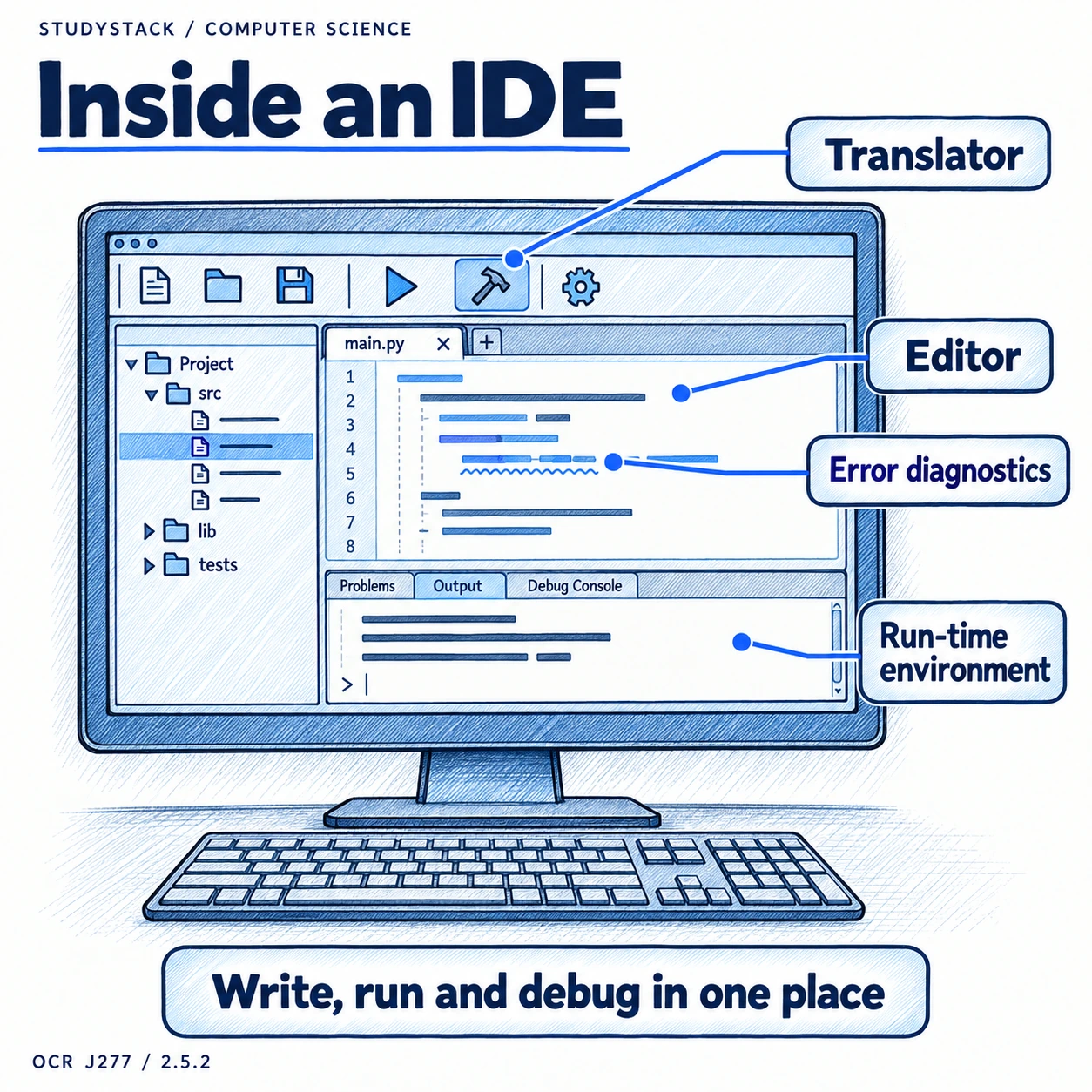
IDE stands for Integrated Development Environment.
It is a software package that gives programmers a central place to write, edit, run, and debug programs using built-in tools.
Writing Code
Editors and error diagnostics
These two tools help programmers produce correct code more quickly.
- The editor is where the source code is typed and changed.
- Editors often include features such as syntax highlighting and line numbering.
- Error diagnostics help identify mistakes and point out where the problem is.
Running Code
Run-time environment and translators
Once code has been written, the IDE helps the programmer test it.
- The run-time environment lets the programmer run and test the program.
- The translator converts source code into a form the computer can run.
- Together, these tools help the programmer spot and fix errors more efficiently.
Why Programmers Use IDEs
How IDE tools support development
Focus on the purpose of the tools, not just a list of names.
- Editors make code easier to create and manage.
- Diagnostics help programmers fix mistakes quickly.
- The run-time environment makes testing faster.
- Built-in translators save time and keep everything in one place.
Key takeaways
- An IDE brings together useful programming tools in one place.
- The editor is where code is written and changed.
- Error diagnostics help spot problems quickly.
- The runtime environment and translator help the programmer test and run the program.
Glossary
- IDE
- An Integrated Development Environment that combines programming tools in one place.
- Editor
- The tool in an IDE used to write and change source code.
- Error diagnostics
- Tools that help identify and explain problems in code.
- Run-time environment
- The part of the IDE used to run and test a program.
- Translator
- A tool that converts source code into machine code or another executable form.
Test yourself
4 questions
What does IDE stand for?
Integrated Development Environment.
What is the job of the editor in an IDE?
To let the programmer write and edit source code.
What do error diagnostics help with?
They help identify and explain mistakes in the code.
What does the run-time environment do?
It lets the programmer run and test the program.
Common questions
Why do programmers like using an IDE?
Because it keeps useful tools together in one place and speeds up writing, running, and debugging code.
Is an IDE the same as a programming language?
No. The programming language is what the code is written in. The IDE is the software used to work on that code.
Do I need to know brand-specific IDE features for OCR J277?
No. Focus on the main tools named in the specification and what they do.