1.2.5
Compression
Compression reduces file size so files take up less storage space and can be transferred more quickly. You need to know why compression is used, the difference between lossy and lossless compression, and which one is most suitable in different situations.
On this page8 sectionsHide
What you need to know
- Explain why compression is used for storage and transmission.
- Describe the difference between lossy and lossless compression.
- Explain the advantages and disadvantages of each type.
- Choose the most suitable compression type for a scenario.
Big Picture
Why compression is used
Compression is used because smaller files are easier to store and faster to send.
If a file is smaller, it uses less storage space on a device. It can also be sent across a network more quickly because there is less data to transmit.
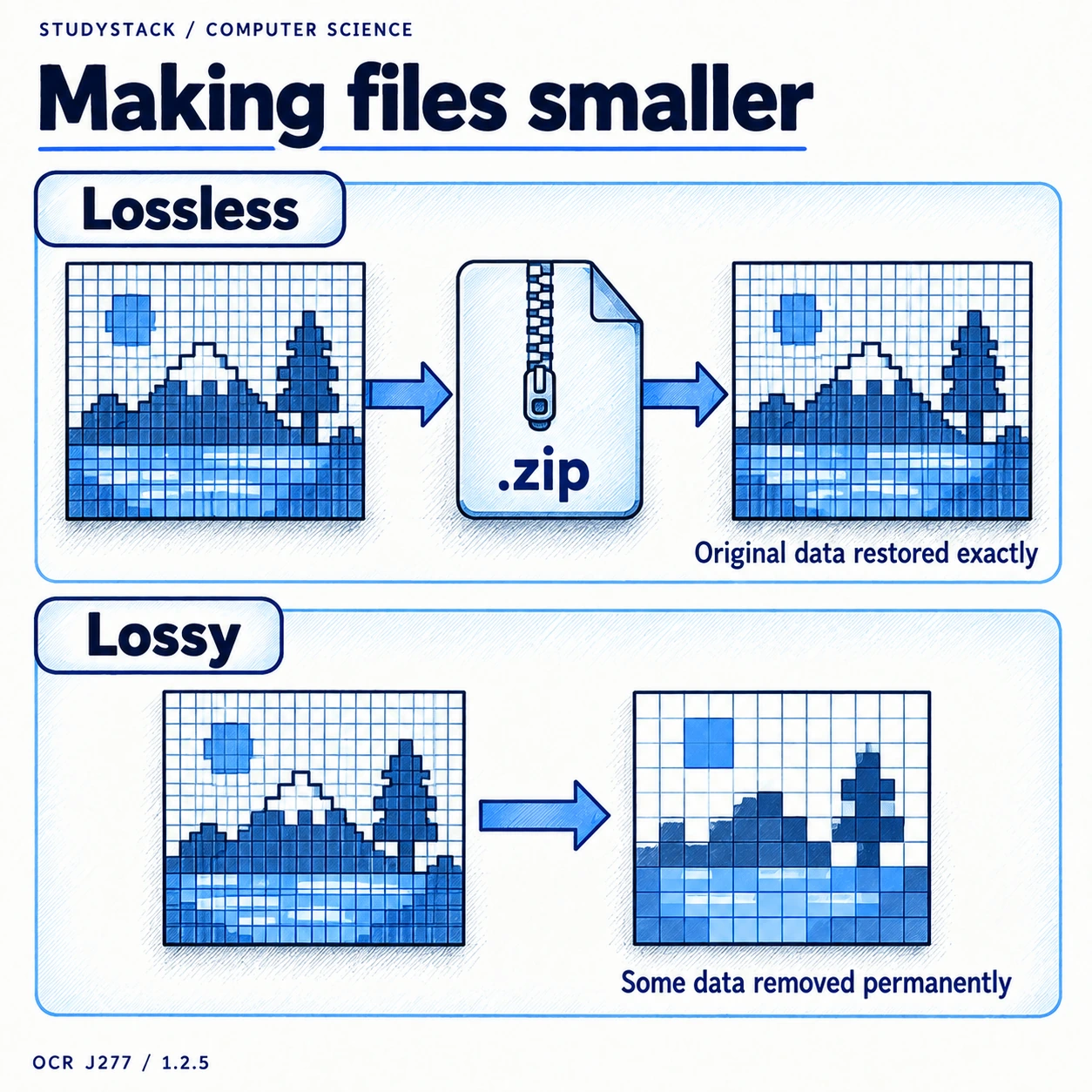
This is especially useful for email attachments, web content, streaming, and devices with limited storage capacity. The final use of the file matters because some files can tolerate data loss while others cannot.
- Reduces storage space needed.
- Speeds up file transfer.
- Makes large files easier to send.
- Can make online content load faster.
Type 1
Lossless compression
Lossless compression reduces file size without permanently removing any original data.
Because all the data is preserved, the original file can be reconstructed exactly when it is decompressed.
This makes lossless compression suitable when accuracy matters, such as for text files, program files, spreadsheets, or important data records. Common examples include zipped files and file formats such as PNG or PDF.
- No permanent data is lost.
- The original file can be rebuilt exactly.
- Best when accuracy matters more than achieving the smallest possible file.
- Typical examples: ZIP, PNG, GIF, PDF.
Best for exact data
Use lossless compression when the file must be recovered exactly, such as text or program files.
Type 2
Lossy compression
Lossy compression makes files smaller by permanently removing some data.
Because some information is discarded, lossy compression usually gives a much greater reduction in file size than lossless compression.
The trade-off is that quality may be reduced. This is often acceptable for media such as photographs, streamed music, video, or web images where a smaller file may matter more than perfect quality.
- Permanently removes some data.
- Usually produces much smaller files.
- Can reduce quality.
- Common when small file size matters most.
- Typical examples: JPEG, MP3, WMV and other media formats.
Permanent change
Once data has been removed by lossy compression, it cannot be fully recovered.
Comparison
Lossy vs lossless
Exam questions often ask you to compare the two types directly.
| Feature | Lossless | Lossy |
|---|---|---|
| Original data | Kept in full | Some data removed permanently |
| Reconstruction | Original can be restored exactly | Original cannot be fully restored |
| File-size reduction | Usually smaller reduction | Usually larger reduction |
| Best for | Text, programs, exact data | Audio, video, images where some quality loss is acceptable |
| Effect on file | Content stays exact | Some detail or accuracy may be lost |
Not required
You do not need to carry out specific compression algorithms. Focus on when each type should be used and what effect it has on the file.
High-Value Exam Skill
Choosing the right compression in a scenario
The correct answer depends on what matters more in the scenario: exact accuracy or small file size.
If a file must stay exact, such as source code, spreadsheets, or software, lossless compression is the better choice.
If a company wants the smallest possible media files for streaming or fast downloads, lossy compression may be the better option because some quality loss is acceptable.
- Ask whether any data can be lost.
- If the file must stay exact, choose lossless.
- If tiny file size matters most and some quality loss is acceptable, choose lossy.
Strong exam sentence
Lossless compression is more suitable here because the original file must be reconstructed exactly with no data loss.
Key takeaways
- Compression reduces file size.
- Lossy compression removes some data permanently to achieve smaller files.
- Lossless compression keeps all the original data so the file can be rebuilt exactly.
- The best choice depends on whether smaller size or perfect accuracy matters more.
Glossary
- Compression
- Reducing file size to save storage space or reduce transfer time.
- Lossless compression
- Compression where the original file can be reconstructed exactly.
- Lossy compression
- Compression where some data is permanently removed to reduce file size further.
Test yourself
5 questions
Why is compression used?
To reduce file size for storage and transfer.
What is lossless compression?
Compression where the original file can be rebuilt exactly.
What is lossy compression?
Compression that permanently removes some data to make the file smaller.
Which type is best for program files?
Lossless compression, because the data must stay exact.
Which type is often used for streamed media?
Lossy compression, because smaller file size is often more important than perfect quality.
Common questions
Why does compression help when sending files?
Because smaller files take less time to transfer across a network and are easier to send as attachments.
What is the difference between lossy and lossless compression?
Lossless keeps all the original data and allows exact reconstruction, while lossy permanently removes some data to achieve a smaller file size.
When should I use lossless compression?
Use it when the file must be recovered exactly, such as text files, spreadsheets, or program files.
When should I use lossy compression?
Use it when very small file size matters more than perfect quality, such as for streaming audio or video.