1.2.1
Primary Storage (Memory)
Primary storage is the memory the CPU can access directly while the computer is working. You need to understand why computers need primary storage, the difference between RAM and ROM, what each one is used for, how virtual memory works when RAM is full, and why cache helps performance.
On this page10 sectionsHide
What you need to know
- Explain why a computer needs primary storage and why secondary storage alone would be too slow.
- Compare RAM and ROM using volatility, read/write capability, and purpose.
- Describe the purpose of RAM, ROM, cache, and the bootstrap loader.
- Explain when virtual memory is needed, how it works, and why it can slow the system down.
Big Picture
Why computers need primary storage
A computer needs primary storage because the CPU must be able to access current programs and data quickly while they are being used.
Programs are normally stored long-term on secondary storage such as an SSD or hard drive. Before the CPU can run a program, that program and any data it needs must be loaded into primary storage.
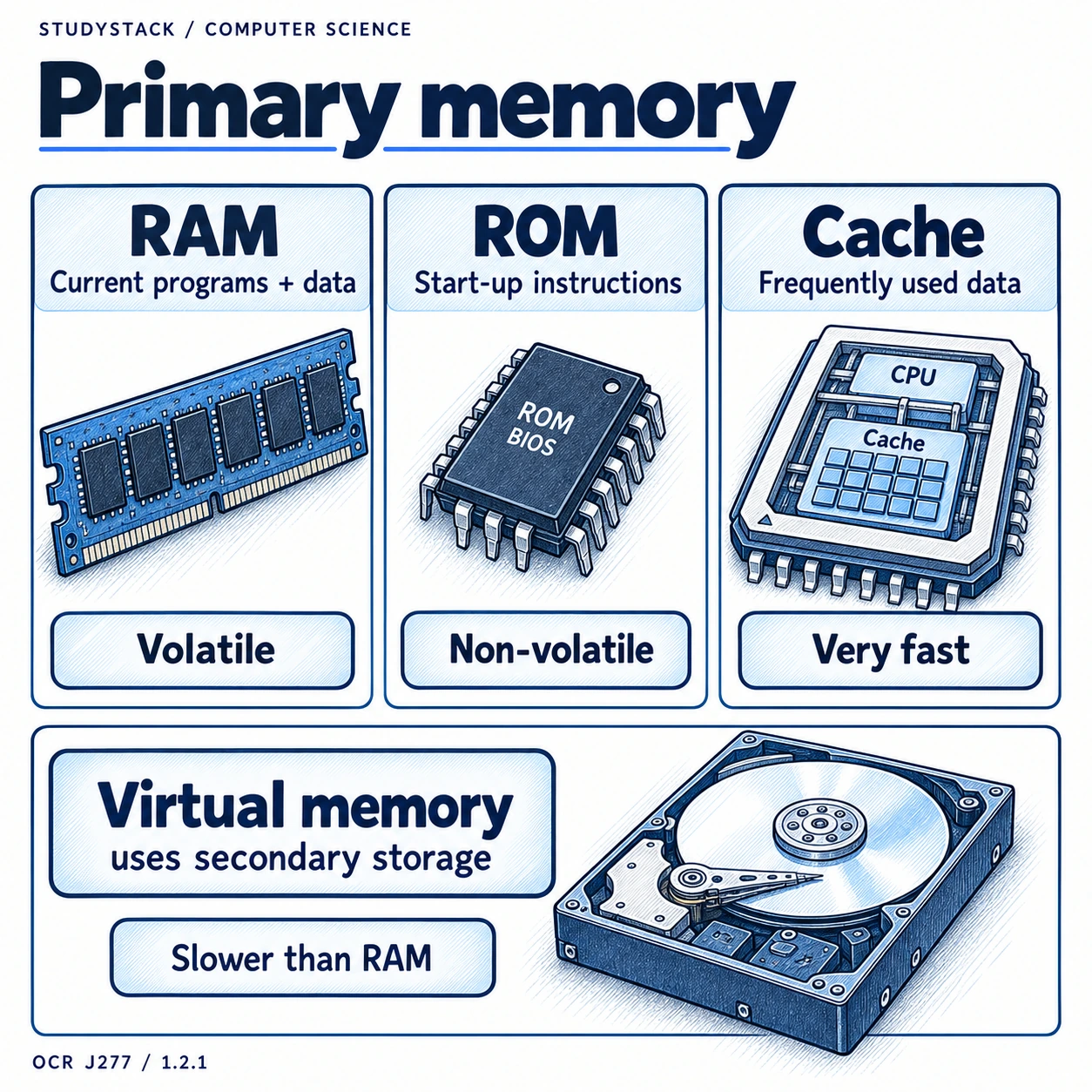
This is necessary because secondary storage is far too slow for the CPU to work from directly all the time. Primary storage acts as a much faster working area so the processor can fetch instructions and data without huge delays.
- Primary storage is directly accessible by the CPU.
- It stores data and instructions currently in use.
- It is needed because secondary storage is too slow to act as working memory.
- Primary storage usually means RAM, ROM, and cache.
Easy definition
Primary storage is the memory the CPU can access directly for the programs and data it is using now.
Memory Type 1
RAM: the computer’s working memory
RAM stands for Random Access Memory and is used for temporary storage while programs are running.
When you open an app, load a file, or run the operating system, the parts currently needed are placed into RAM. The CPU can then access them quickly while the computer is working.
RAM is volatile, which means its contents are lost when the power is turned off. It is also read-write, so data can be changed while the computer is running.
The term random access means any memory location can be accessed directly. It does not mean the data is arranged randomly.
- Stores programs and data currently in use.
- Volatile: contents are lost when power is off.
- Read-write: data can be changed.
- Main purpose: provide fast temporary working storage.
Common mix-up
RAM is not for long-term storage. If the power goes off, unsaved work in RAM is lost.
Memory Type 2
ROM and the bootstrap loader
ROM stands for Read Only Memory and stores important start-up instructions that must still be there when the computer is switched on.
ROM is non-volatile, so its contents stay there even when the computer has no power. That makes it ideal for storing instructions the machine needs immediately on start-up.
One key example is the bootstrap loader. This small program helps the computer begin the boot process by locating and loading the operating system into RAM.
- ROM is non-volatile.
- ROM is mainly read-only.
- It stores permanent instructions needed at start-up.
- The bootstrap loader is stored in ROM so the computer can begin booting.
Why ROM matters
Without ROM, the computer would have no permanent instructions available to start loading the operating system.
Comparison
RAM vs ROM: the differences you must know
Exam questions often ask you to compare RAM and ROM directly, so it helps to keep the contrasts sharp.
| Feature | RAM | ROM |
|---|---|---|
| Volatility | Volatile | Non-volatile |
| Read/write | Read-write | Mainly read-only |
| Purpose | Stores data and programs currently in use | Stores start-up instructions such as the bootstrap loader |
| When used | While the computer is running | Especially needed when the computer starts up |
| Typical role | Temporary working memory | Permanent start-up memory |
Key Process
Virtual memory: what happens when RAM is full
Sometimes a computer runs out of physical RAM, especially when lots of programs are open or a program is very large.
Virtual memory is a section of secondary storage that is used as if it were extra RAM. If RAM becomes full, the operating system moves some data out of RAM and onto the SSD or hard drive to free space.
When that moved data is needed again, it is swapped back into RAM. This means the computer can keep running, but it usually becomes slower because secondary storage is much slower than RAM.
If too much swapping happens, the system can spend more time moving data than actually processing it. This is what makes a computer feel very sluggish.
- Used when RAM is full.
- Uses part of secondary storage as extra memory.
- Data is swapped between RAM and secondary storage.
- It allows programs to continue running, but performance drops.
Good exam wording
Virtual memory is needed when RAM is full, and it works by swapping data between RAM and secondary storage.
Fast Memory
Cache: small but very fast
Cache is also part of primary storage and is used to speed up processing by keeping frequently used data and instructions close to the CPU.
Cache is much faster than RAM but has a much smaller capacity. Because it is so quick to access, it helps reduce the number of times the CPU has to wait for data from RAM.
This improves performance, especially when the same instructions or data are needed repeatedly. That is why cache appears both in memory topics and in CPU performance topics.
- Cache is faster than RAM.
- Cache is smaller than RAM.
- It stores frequently used data and instructions.
- Its purpose is to reduce delays and improve CPU performance.
Memory speed order
A useful memory speed order is: registers, cache, RAM, then virtual memory on secondary storage.
Understanding
A simple way to picture the memory system
Each type of memory has a different job, and seeing them that way makes the topic click.
- ROM gets the computer started.
- RAM holds the work the computer is doing right now.
- Cache helps the CPU get common data even faster.
- Virtual memory is a slower backup area used only when RAM runs short.
- Secondary storage keeps files and programs permanently when they are not actively being used.
Think of it like this
ROM is the starter instructions, RAM is the working area, cache is the speed booster, and virtual memory is the overflow space.
Key takeaways
- Primary storage holds the data and instructions the CPU needs right now.
- RAM is volatile and read-write, while ROM is non-volatile and mainly read-only.
- ROM stores start-up instructions such as the bootstrap loader.
- Virtual memory uses secondary storage as extra memory when RAM is full, but it is much slower.
Glossary
- Primary storage
- Memory directly accessible by the CPU for data and instructions currently in use.
- RAM
- Random Access Memory, volatile read-write memory used for temporary working storage.
- ROM
- Read Only Memory, non-volatile memory used to store permanent start-up instructions.
- Bootstrap loader
- A small program stored in ROM that helps load the operating system when the computer starts.
- Virtual memory
- A section of secondary storage used as extra memory when RAM is full.
- Cache
- A small amount of very fast memory close to the CPU for frequently used data and instructions.
Test yourself
5 questions
Why is primary storage needed?
Because the CPU needs fast direct access to the programs and data currently being used.
What is the difference between RAM and ROM?
RAM is volatile and read-write, while ROM is non-volatile and mainly read-only.
What is stored in ROM?
Permanent start-up instructions such as the bootstrap loader.
When is virtual memory used?
When physical RAM is full and the system needs extra memory space.
Why can using lots of virtual memory slow a computer down?
Because secondary storage is much slower than RAM, so swapping data takes longer.
Common questions
What is primary storage in OCR GCSE Computer Science?
Primary storage is the memory the CPU can access directly. In OCR J277, this usually includes RAM, ROM, and cache.
Why is RAM called volatile memory?
Because it loses its contents when the power is turned off, unlike ROM or secondary storage which keep their data.
What does the bootstrap loader do?
It is a small start-up program stored in ROM that begins the boot process by helping load the operating system into RAM.
Is virtual memory the same speed as RAM?
No. Virtual memory uses secondary storage, which is much slower than RAM, so heavy use of virtual memory reduces performance.