1.5.1
Operating Systems
An operating system is the main piece of system software that manages the computer and provides the platform for applications to run. You need to know what the operating system does in practice, including memory management, multitasking, peripheral management, user management, and file management.
On this page10 sectionsHide
What you need to know
- Describe the main functions of an operating system.
- Explain the features of a user interface.
- Explain memory management and how it supports multitasking.
- Describe peripheral management, drivers, user management, and file management.
Big Picture
What an operating system does
Without an operating system, most general-purpose computers would be very hard to use.
The operating system controls the basic running of the computer. It manages hardware, provides the user interface, and allows applications to use system resources.
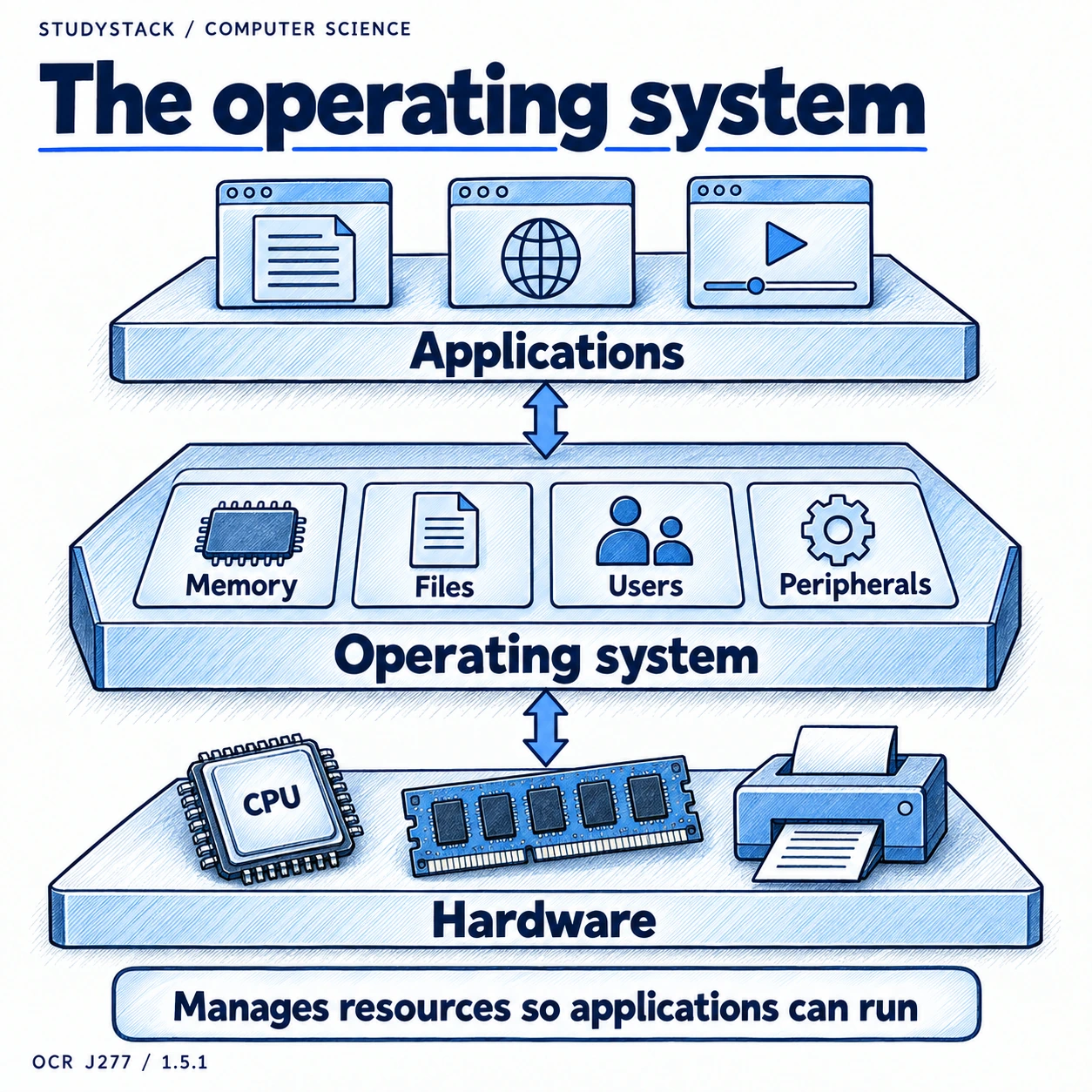
| Function | What it means in practice |
|---|---|
| User interface | Lets the user interact with the system |
| Memory management | Allocates and manages memory for programs and data |
| Peripheral management | Controls devices such as printers and keyboards |
| User management | Controls accounts, access rights, and security |
| File management | Organises files, folders, saving, and moving data |
Key Ideas
Operating system vs application software
This comparison shows why the operating system matters.
The operating system is the main system software that runs the computer, manages the hardware, and provides the platform other software depends on.
Application software is written to help the user do a task such as word processing, browsing the web, or editing images. Applications rely on the operating system to access memory, storage, input devices, and output devices.
Quick distinction
The operating system runs the computer. Applications run on top of the operating system to help the user do specific jobs.
Interaction
Graphical and command-line interfaces
The focus is on understanding interface features rather than memorising history.
A user interface is the way the user communicates with the computer. Different interfaces suit different users and situations.
A GUI is often more approachable because users can see icons, windows, and menus. A CLI can be powerful for expert users because commands can be entered quickly and precisely.
- A GUI uses windows, icons, menus, and pointers.
- A CLI uses typed text commands.
- A GUI is easier for many users to learn.
- A CLI can be faster and more direct for experienced users.
Comparison shortcut
A GUI is often easier to use, while a CLI can give more direct control with less screen clutter.
Resources
Memory management and multitasking
The operating system has to keep track of where programs and data are in memory.
When several applications are open, the operating system allocates memory to each one and moves data between memory and the processor as needed.
This management allows a computer to appear to do several tasks at once by switching rapidly between them.
- Memory is allocated to applications.
- Data must move between devices, memory, and the processor.
- The operating system has to keep track of which program is using which memory.
- Multitasking depends on the operating system managing resources efficiently.
Not required
You do not need to learn detailed paging or segmentation.
Key Terms
The words you need to understand clearly
Once the main terms stop sounding abstract, the rest of this topic follows more easily.
- Memory management means deciding where running programs and data are stored while they are being used.
- Multitasking means the operating system manages several tasks so the computer appears to do more than one thing at once.
- A peripheral is an external or connected device such as a printer, keyboard, or scanner.
- A driver is software that helps the operating system communicate with a specific device.
- Access rights are rules about what a user is allowed to open, change, or delete.
Devices
Peripheral management and drivers
The operating system has to control many different devices, even though those devices may be made by different companies.
Peripheral management controls communication with devices such as printers, keyboards, storage devices, and scanners. The operating system needs a way to send the right instructions and receive data back from each device.
Drivers act as translators between the operating system and a specific device. Without the correct driver, the operating system may not understand how to use that hardware properly.
- Drivers help the operating system communicate with devices.
- Peripheral management helps devices work correctly with the computer.
- Different devices may need different drivers.
Organisation and Security
User management and file management
These features help keep a system organised and make sure the right people can access the right data.
User management handles accounts, passwords, and access rights. This matters on shared systems because not every user should be able to change every file or setting.
File management covers naming, saving, moving, copying, deleting, and organising files into folders. A well-managed file system helps users find work quickly and reduces mistakes or accidental loss.
- User accounts and access rights improve security.
- File management keeps data organised and easier to access.
- Shared systems depend on sensible user management.
Key takeaways
- The operating system manages the hardware and provides a platform for software to run.
- A user interface allows the user to communicate with the computer.
- Memory management controls where data and programs are stored in memory while they are running.
- Peripheral management, user management, and file management all help the system run smoothly and securely.
Glossary
- Operating system
- System software that manages the computer and provides a platform for applications.
- GUI
- Graphical User Interface that uses windows, icons, menus, and pointers.
- CLI
- Command-Line Interface that uses typed text commands.
- Memory management
- The operating system function that allocates and tracks memory for running programs and data.
- Driver
- Software that allows the operating system to communicate with a hardware device.
- Peripheral
- A device connected to a computer, such as a printer, keyboard, or scanner.
- Multitasking
- Running or appearing to run more than one task at the same time.
- Access rights
- Rules that control what a user is allowed to view or change.
Test yourself
5 questions
What is the main job of an operating system?
To manage the hardware and provide the platform and tools needed for software and users to interact with the computer.
What is a driver?
Software that allows the operating system to communicate with a specific hardware device.
Why is memory management needed?
Because the system must decide where programs and data go in memory and manage them while tasks are running.
What does peripheral management do?
It controls communication between the operating system and connected devices such as printers, keyboards, and scanners.
What does file management include?
Naming, saving, moving, organising, and storing files and folders.
Common questions
Why do computers need an operating system?
Because it manages the hardware, provides the user interface, and allows applications to run efficiently and securely.
What is the difference between a GUI and a CLI?
A GUI uses visual elements such as windows and icons, while a CLI uses typed commands.
How does the operating system help with multitasking?
It allocates memory and processor time so several tasks can be managed at once, even on a single machine.