3.2
Ideas Generation Documents
Mind maps grow ideas outwards from one topic. Mood boards show what something should look and feel like. Both come early, both get evaluated in Section B, and both are marked on whether a named person could actually use them.
On this page8 sectionsHide
What you need to know
- Know the components and conventions of a mind map and a mood board.
- Choose suitable hardware and software, and say what each one does.
- Explain why a particular person would use each document.
- Evaluate the figure in front of you and justify a specific improvement.
Read the figure
Mind maps: growing ideas outwards
A mind map puts one topic in the middle and connects it outwards. Main branches are the broad categories; sub-branches get specific. Keywords, short phrases, connecting lines, colour coding and small images all help someone follow how the ideas relate. Hand drawn or digital both count.
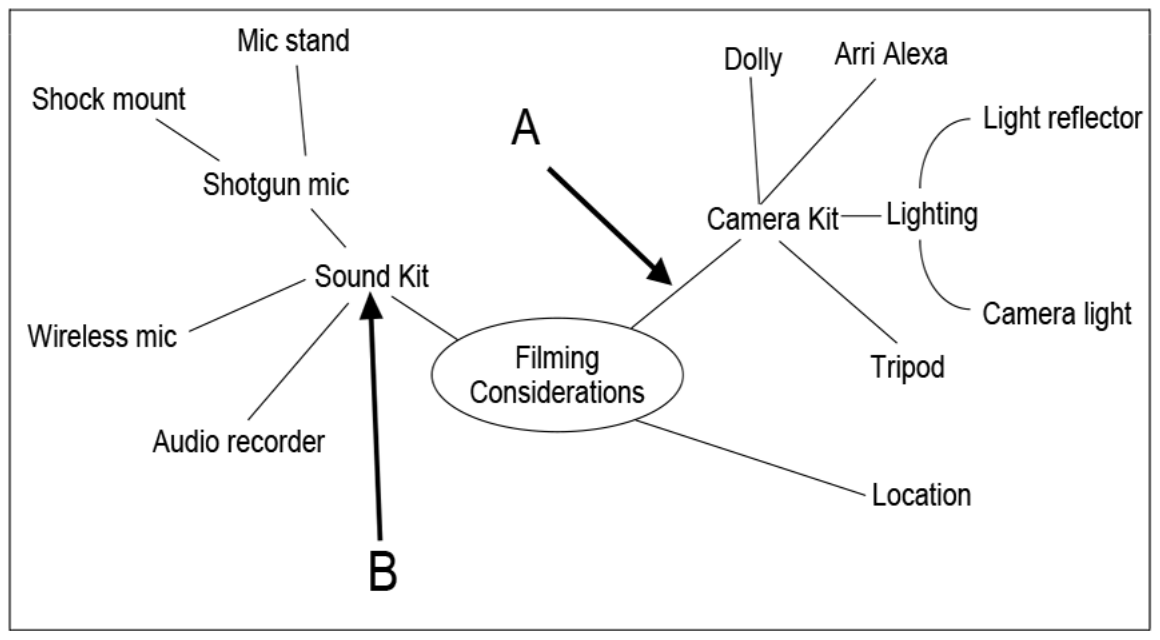
1.The central topic
Everything hangs off “Filming Considerations” in the middle. A mind map without a clear centre is just a list with lines drawn on it.
- The central topic. Everything hangs off “Filming Considerations” in the middle. A mind map without a clear centre is just a list with lines drawn on it.
- A main branch. Camera Kit is a broad category — the first level out from the centre. Sound Kit and Location are the other two.
- Sub-branches add the detail. Lighting splits again into light reflector and camera light. Each level out gets more specific, which is what makes the document useful to plan from.
- This branch is underdeveloped. Location has nothing coming off it. That is the improvement worth writing about: add sub-branches for possible places, access, permissions or power.
- Compare with a well-developed branch. Sound Kit reaches three levels — shotgun mic, then shock mount and mic stand. That is the standard the Location branch should be brought up to.
For a community music festival the branches might be audience, performers, promotion and ticketing. Promotion splits into a radio trailer, posters and social posts. That lets a team explore options without committing to one design, and lets a client point at a gap and say “what about parking?”.
The connections are the point
A page of unconnected words is not a mind map. The branches have to show how each idea relates to the one it came from.
How it works
Mood boards: agreeing the feel
A mood board gathers reference material to communicate the intended style — photographs, illustrations, colour swatches, font examples, textures, patterns, short notes. The designer uses it for direction; the client uses it to approve the atmosphere before anyone spends time on detailed design.
A board for that music festival might put warm colour samples next to lively crowd photographs, hand-drawn lettering and rough paper textures. Together those say informal outdoor event. What they do not say is where anything goes on the poster — that is a visualisation diagram’s job.
| Format | What can go on it | The trade-off |
|---|---|---|
| Physical mood board | Printed photographs, magazine cuttings, fabric, paper samples, handwritten notes. | Real texture you can feel — but it has to be carried to people or photographed to share. |
| Digital mood board | Image files, colour values, font samples, embedded or linked audio and video. | Easy to edit and share remotely — but every link has to still work for whoever opens it. |
Learn the list
Tools, and what each one is for
A hardware question wants a physical device. A software question wants an application or a type of application. And when the command word is explain, say what it does — naming a famous program on its own does not tell the examiner why it suits the job.
| Tool | What it does |
|---|---|
| Computer or tablet | Runs the application you build the document in. |
| Camera | Captures your own photographs to use as references. |
| Scanner | Turns paper sketches, photos or texture samples into image files. |
| Keyboard, mouse or graphics tablet | Enters labels, positions objects, draws branches. |
| Mind-mapping software | Creates connected nodes you can rearrange as ideas change. |
| Presentation, graphics or publishing software | Arranges images, colours and notes on a digital mood board. |
How it works
Making the document useful to whoever reads it
Do not evaluate a document by whether you like it. A useful comment points at evidence, says whether it is a strength or a limitation, and connects it to what a named person is trying to do with it.
- Mind map: a clear central topic, relevant branches and labels someone can actually read.
- Mind map: develop the vague branches into options a client can discuss, rather than leaving them as one word.
- Mood board: choose references that fit the audience, the purpose and the client’s identity.
- Mood board: pin down a colour palette and typography so the designer can reproduce the style rather than guess at it.
- Both: annotate anything whose relevance would not be obvious to someone who was not in the room.
Read the figure
Evaluating a draft mood board
Work through it the way the walkthrough above does: find something that works, find something that does not, and say what you would change. Then finish each point by naming who benefits — here, the campaign content creator.

1.The subject comes across
The elephant photographs make the conservation subject obvious straight away. That is a genuine strength — the content creator knows what the campaign is about before reading a word.
- The subject comes across. The elephant photographs make the conservation subject obvious straight away. That is a genuine strength — the content creator knows what the campaign is about before reading a word.
- Typography is pinned down. The typeface specimen shows a full alphabet, so a designer could reproduce this lettering. It is the most reusable thing on the board.
- References overlap. The lettering sits on top of the landscape and hides part of it. Separating the references into clear groups would let the creator compare them properly.
- No colour palette. Nothing labels a set of campaign colours. Labelled swatches would let the content creator keep the palette consistent across posters, social posts and the website.
- Nothing is annotated. These photographs could be the audience, the setting, or the photographic style being proposed — the board never says. A short note beside each reference would make its purpose clear.
“Add more information” is not an improvement. “Add labelled colour swatches so the content creator can keep the palette consistent across the campaign” is, because it names the change and the person it helps.
Worked answer
3 marks
Suggest one improvement to the mood board and explain how it would help the campaign content creator.
Tempting, but this does not score
Add more images and information to the mood board so it gives the content creator a better idea of what the campaign should look like.
The board is already crowded — more images is the opposite of what it needs. And “a better idea” never says what the creator could then actually do.
Worth writing
Add labelled colour swatches to the board. At the moment the only style decision pinned down is the typeface, so the content creator has nothing to work from when choosing campaign colours. Labelled swatches would let them apply the same palette across the posters, the social posts and the website, so the campaign looks like one thing rather than three.
Where the marks come from
- Names a specific, addable improvement rather than “more detail”.
- Grounds it in the figure — typography is pinned down, colour is not.
- Says what the named user can then do: apply one palette across the campaign.
- Gives the outcome that matters to the client — a consistent campaign.
The shape of an evaluation point
Evidence you can see → the effect it has → who that affects. “The references overlap, so part of each is hidden, which makes it harder for the designer to compare them.”
Key takeaways
- A mind map runs from a central topic into branches and sub-branches.
- A mood board collects references — images, colours, typography, textures.
- A physical board can show real texture but cannot play audio or video.
- A good evaluation names evidence, proposes a change, and says who it helps.
- Never invent colours from a monochrome copy of a figure.
Glossary
- Mind map
- A document that develops linked ideas outwards from a central topic.
- Mood board
- A collection of references communicating a proposed style or feel.
- Branch
- A connection from one idea to a related, usually more specific, idea.
- Colour swatch
- A labelled sample of a colour proposed for a design.
- Annotation
- A note on a document explaining a feature or a decision.
Test yourself
6 questions
Which document is for expanding one idea into related categories?
A mind map.
Give two things you could put on a physical mood board.
For example printed photographs and fabric samples. Audio and video are not options on a physical board.
Why would a scanner help when building a digital mood board?
It turns paper references and texture samples into image files you can place on the board.
Why do labelled colour swatches matter?
They give the designer a palette they can reproduce, so the campaign looks consistent across everything.
Does a mood board show the final layout?
No. It communicates style and inspiration. A visualisation diagram is what shows the intended arrangement.
What makes a mind map branch weak?
Stopping at one word. A branch with no sub-branches has not been developed into anything anyone can plan from.
Common questions
Can a mind map contain images?
Yes. What makes it a mind map is the central topic and the connected branches, not whether it is text-only.
Can I use generic improvements in an evaluation?
No — use the figure. Say what is actually there or missing, propose a specific change, and link it to the user the question named.
The figure is printed in black and white. Can I comment on colour?
You can say a palette is missing or unlabelled. Do not describe colours you cannot see in the copy you were given.